Thursday, August 7, 2008

opensource.mycompany.com

Using GPL software imposes the requirement to redistribute the source code, but this requirement is routinely ignored in commercial products. That is a shame: even if one doesn't care about the goals of the free software movement, simple pragmatism would still favor providing the source code. Violating the GPL can cause Bad Things™  to happen, and compliance isn't very difficult. It is quite common for products to incorporate an almost unmodified busybox, glibc, and Linux kernel. Providing the source code for these cases is straightforward, and doesn't risk inadvertently giving away intellectual property.

Section 3 of version 2 of the GNU Public License concerns the responsibility to distribute source code along with a binary:

  3. You may copy and distribute the Program (or a work based on it, under Section 2) in object code or executable form under the terms of Sections 1 and 2 above provided that you also do one of the following:

a) Accompany it with the complete corresponding machine-readable source code, which must be distributed under the terms of Sections 1 and 2 above on a medium customarily used for software interchange; or,

b) Accompany it with a written offer, valid for at least three years, to give any third party, for a charge no more than your cost of physically performing source distribution, a complete machine-readable copy of the corresponding source code, to be distributed under the terms of Sections 1 and 2 above on a medium customarily used for software interchange; or,

c) Accompany it with the information you received as to the offer to distribute corresponding source code. (This alternative is allowed only for noncommercial distribution and only if you received the program in object code or executable form with such an offer, in accord with Subsection b above.)

The source code for a work means the preferred form of the work for making modifications to it. For an executable work, complete source code means all the source code for all modules it contains, plus any associated interface definition files, plus the scripts used to control compilation and installation of the executable. However, as a special exception, the source code distributed need not include anything that is normally distributed (in either source or binary form) with the major components (compiler, kernel, and so on) of the operating system on which the executable runs, unless that component itself accompanies the executable.
 
If distribution of executable or object code is made by offering access to copy from a designated place, then offering equivalent access to copy the source code from the same place counts as distribution of the source code, even though third parties are not compelled to copy the source along with the object code.

 
GNU logo

I am not a lawyer, though I think it might be fun to play one on TV. There is a lot of detail in the GPL about the requirements for distribution of source code, and maybe I'm dense but I don't understand what half of it means. However I would contend that if you get to the point of needing to argue over the precise definition of the terms in a legal context, you've already failed.

The problem with violating the GPL is not that you'll get sued. Of course, it is quite possible you'll be sued for violating the GPL...

... but getting sued is not the real problem. The real problem is when a posting about misappropriation of GPL software shows up on Slashdot and LWN. The real problem is when every public-facing phone number and email address for your company becomes swamped by legions of Linux fans demanding to know when you will provide the source code. The real problem persists for years after the event, when Google searches for the name of your products turn up links about GPL violations coupled with ill-informed but damaging rants.

So we want to avoid that outcome. If you read the legal complaints filed by the Software Freedom Law Center, they follow a similar pattern:

  1. Someone discovers a product which incorporates GPL code such as busybox, but cannot find the source code on the company web site (probably because the company hasn't posted it).
  2. This person sends a request for the source code to an address they find on that website, possibly support@mycompany.com.
  3. This request is completely ignored or receives an unsatisfactory response.
  4. The person contacts SFLC, who sends a letter to the legal department of the infringing company demanding compliance with the license and that steps be taken to ensure no future infringements take place.
  5. SFLC also demands compensation for their legal expenses; thats how they fund their operation.
  6. The corporate legal team, misreading the complaint as a shakedown attempt, stonewalls the whole thing or offers some steps but refuses to pay legal costs.
  7. Lawsuit is filed, and the PR nightmare begins in earnest.

 
Keeping Bad Things From Happening

There are two points in that progression where the bad result could be averted, in steps #2 and #4. Unfortunately it is not likely you can influence either one:

  • In step #2 you have no idea where that initial request for the source code will go. They might send email to the sales department, or tech support. They might call the main corporate number and chat with the answering service. The request will very likely be filtered out before it makes it to someone who would realize its significance.
  • By the time the lawyers get involved in step #4, you're already toast. Corporations, particularly medium to large corporations, are routinely targeted to extract money for licensing intellectual property, business partnerships, or any number of reasons. The GPL claim will look like all the rest, and be treated in the same way.

This is a case where it is best to be proactive. One can't realistically wait until the first time someone requests the source code, too many things can go wrong and lead to the PR nightmare. Instead, Gentle Reader, it is best to post the GPL code somewhere that it can be found with little difficulty by someone looking for it, but otherwise draw little attention to itself.
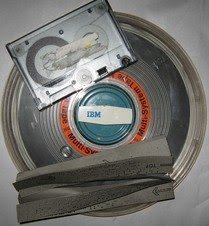
Tapes

When the GPL was created software was delivered via some physical medium (magnetic tapes, later supplanted by floppy disks, CDs, DVDs, etc). One was expected to include the source code on the same medium, or at least be willing to provide another tape containing the source. Nowadays many embedded systems are delivered with the software pre-installed and updates delivered via the Internet, so adding a CD of source code would add to the Cost of Goods Sold. Anything which adds COGS is probably a non-starter, so we'll move on.

It is certainly an option to tar up all of the GPL packages from the source tree and try to get it linked from the corporate website, likely controlled by someone in the marketing department. That conversation may not go the way you want:

"Tell me again why we need to do this?"

"We're not an opensource company, we build widgets."

"Isn't Montavista supposed to take care of this for us?"

"Our market messaging revolves around the power of our brand and the strength of our secret sauce, not opensource code. End of discussion, you commie punk."

The (hypothetical) marketing person is not being unreasonable. Ok, the last one would be unreasonable, but I thought it would be funny. Nonetheless putting GPL source code right up on the corporate website implies it is a primary focus of the corporation, when in reality it probably is just one of many tools you use in building a product. Rather than find a place on the corporate website, I advise a separate site specifically for opensource code. It needs to be something which people can easily find if they are motivated to look for it, but otherwise not draw much attention to itself. opensource.<mycompany>.com or gpl.<mycompany>.com are reasonable conventions.

Next you need a web server. Your company may already work with a web host, otherwise Google Sites is a reasonable (and free) choice. You'll need IT to set up a DNS CNAME directing opensource.<mycompany>.com to point to the new web site. If you're using Google Sites there is a Help Topic on how to do this.

The goal here is to avoid the bad result (GPL violation being posted to slashdot), not draw attention. You shouldn't spend time putting together a snazzy web site, a simple background with links to tarballs is fine. Ideally nobody will ever look at these pages.


Documentation

Lets talk about documentation. There are a number of other open source software licenses, besides the GPL. Many of them carry an "advertising clause," a requirement that "all advertising materials mentioning features or use of this software must display" an acknowledgement of the code used. The use of this clause derives from Berkeley's original license for BSD Unix, and though Berkeley has disavowed the practice there is still a great deal of open source software out there which requires it.

In practice the advertising clause results in a long appendix in the product documentation listing all of the various contributors. Honestly nobody will ever read that appendix, but nonetheless it is worth putting together. You can also include a notice that the GPL code is available for download from the following URL... so if despite your best efforts the company does get sued, you'll have something concrete to point to in defense.


Now for the hard part

The Gentle Reader may have noticed that we have not covered how to locate the GPL code used within a product. Really I'm hoping that the source tree is sufficiently organized to be able to browse the top few levels of directories and look for files named LICENSE and for copyright notices at the top of files. If it is difficult to determine whether the product contains any open source code, there is an article at Datamation which might be helpful. It discusses compliance tools, including tools which look for signatures from well-known codebases to track down more serious GPL violations.

What about the difficult case, where GPL code is being used and has been extended with proprietary code which cannot simply be posted to a website? Even if one doesn't care about the free software ethos, pragmatically this is a ticking time bomb and one that should not be ignored. I'd recommend putting up an opensource website anyway to post what you can, and working as soon as possible to disentangle the rest. Development of new features in that area of the code can be used as the lever to refactor it in a GPL-compliant way.

Update 8/2008: The Software Freedom Law Center has published a GPL compliance guide.

10/2008: Linux Hater's Redux holds up this blog post as an example of why Linux should be avoided. Okey dokey.

12/2008: Add Cisco to the list of companies sued by the SFLC over GPL issues. This time the suit was filed on behalf of the FSF for glibc, coreutils, and other core GNU components. Reactions to the news from Ars Technica and Joe Brockmeier @ ZDNET have already appeared.

5/2009: Cisco and the FSF have settled their lawsuit. Cisco will appoint a Free Software Director, make attempts to notify owners of Liksys products of their rights under the GPL, and will make a monetary contribution to the FSF.
Wednesday, July 23, 2008

The Control Plane is not an Aircraft

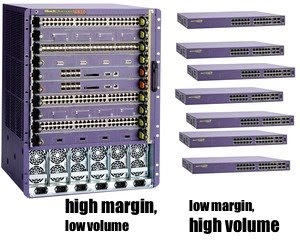
In my industry at least, the high end of the margin curve is dominated by modular systems: a chassis into which cards can be added to add features, increase capacity, etc. Products at the cheaper end of the spectrum tend to be a fixed configuration, a closed box which does stuff but is not terribly expandable (often called a pizza box). The fixed configuration products sell in much larger volumes, but margins are lower.

Chassis has high margins and low volume, fixed config has lower margins and high volumes
Block diagram of fixed configuration system, showing CPU attached to ASICs via a PCI bus

In a pizza box system the control plane between the CPU and the chips it controls tends to be straightforward, as there is sufficient board space to route parallel busses everywhere. PCI is often used as the control interface, as most embedded CPUs contain a PCI controller and a lot of merchant silicon uses this interface.

In a chassis product, there is typically a central supervisor card (or perhaps two, for redundancy) controlling a series of line cards. There are a huge number of options for how to handle the control plane over the backplane, but they mainly fall into two categories: memory mapped and message oriented. In todays article we'll examine the big picture of control plane software for a modular chassis, and then dive into some of the details.


Memory Mapped Control Plane

A memory-mapped chassis control plane extends a bus like PCI over traces on the backplane.

Memory mapped chassis system with PCI over the backplane

To the software, all boards in the chassis appear as one enormous set of ASICs to manage.


Message Passing Control Plane

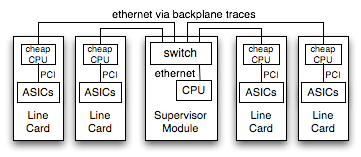
Alternately, the chassis may rely on a network running between the supervisor and line cards to handle control duties. There are PHY chips to run ethernet via PCB traces, and inexpensive switch products like the Roboswitch to fan out from the supervisor CPU out to each slot in the chassis.

Message Passing chassis system with ethernet links

This system requires more software, as each line card runs its own image in addition to the supervisor card. The line cards receive messages from the supervisor and control their local ASICs, while the supervisor has to handle any local ASICs directly and generate messages to control the remote cards.


Programming Model

As the Gentle Reader undoubtedly already knows, the programming model for these two different system arrangements will be radically different.

Memory mapped
ASICs are mapped in as pointers
Message Passing
ASICs controlled using, erm, messages. Yeah.
volatile myHWRegisters_t *p;

p = <map in the hardware>
p->reset = 1;
myHWMessage_t msg;

msg.code = DO_RESET_ASIC;
send(socket, &msg, sizeof(msg), 0);
Perhaps that was obvious. Moving on... At first glance the memory mapped model looks pretty compelling:
  • it the same as a fixed configuration product, allowing easy code reuse
  • in the message passing model you still have to write memory map code to run out on the line card CPUs, and then you have to write the messaging layer

 
Hot Swap Complicates Things

A big issue in the software support for a chassis is support for hot swap. Cards can be inserted or removed from the chassis at any time, while the system runs. The software needs to handle having cards come and go.

With a message passing system hotswap is fairly straightforward to handle: the software will be notified of insertion or removal events, and starts sending messages. If there is a race condition where a message is sent to a card which has just been removed, nothing terrible happens. The software needs to handle timeouts and gracefully recover from an unresponsive card, but this isn't too difficult to manage.

With a memory mapped chassis, hot insertion is relatively simple. The software is notified of an insertion event, and maps in the hardware registers. Removal is not so simple. If the software is given sufficient notice that the card is being removed, it can be cleanly unmapped and safely removed. If the card is yanked out of the chassis before the software is ready, havoc can ensue. Pointers will suddenly reference a non-existant device.


Blame the Hardware

So card removal is difficult to handle robustly in a chassis which memory-maps the line cards.

CompactPCI card showing microswitch and hot-swap LED

Ideally the hardware should help the software handle card removal. For example CompactPCI cards include a microswitch on the ejector lever, which signals the software of an imminent removal. The user is supposed to flip the switch and wait for an LED to light up, an indication that the card is ready to be removed. Of course, people ignore the LED and pull the card out anyway if it takes longer than 1.26 seconds... we did studies, and stuff... ok I just made that number up. Card removal is often then made into a software problem: "Just add a CLI command to deprovision the card, or something."

This makes for a reasonably nasty programming environment: to be robust you have to constantly double-check that the card is still present. Get a link up indication from one of the ports? Better check the card presence before trying to use that port, in case the linkup turns out to be the buswatcher's 0xdeadbeef pattern. Read an indication from one of the line cards that its waaaaay over temperature? Check that it is still there before you begin shutting the system down, it might just be a garbage reading.


Pragmatism is a Virtue

There is a maxim in the marketing strategy for a chassis product line: never let the customer remove the chassis from the rack - they might replace it with a competitors chassis. You can evolve the design of the line cards and other modules, but they must function in the chassis already present at the customer site. Backplane designs thus remain in production for a long time, often lasting through several generations of card designs before finally being retired. Though the Gentle Reader might have a firm preference for one control plane architecture or another, the harsh reality is that one likely has to accept whatever was designed in years ago.

So we'll spend a little time talking about the software support for the two alternatives.


Thoughts on Memory Mapped Designs

Software to control a hardware device does not automatically have to run in the kernel. There are only a few things which the kernel absolutely has to do: Driver code can run in user space

  1. map the physical address of the device in at a virtual address
  2. handle interrupts and mask the hardware IRQ
  3. deal with DMA, as this involves physical addressing of buffers

Everything else, all of the code to initialize the devices and all of the higher level handling in response to an interrupt, can go into a user space process where it will be easier to debug and maintain. The kernel driver needs to support an mmap() entry point, allowing the process to map in the hardware registers. Once mapped, the user process can program the hardware without ever calling into the kernel again.


Thoughts on Message Passing Designs

First, an assertion: RPC is a terrible way to implement a control plane. One of the advantages of having CPUs on each card is the ability to run operations in parallel, but using remote procedure calls means the CPUs will spend a lot of their time blocked. The control plane should be structured as a FIFO of operations in flight, without having to wait for each operation to complete. If information is needed from the remote card it should be structured as a callback, not a blocking operation.

It is tempting to implement the control communications as a series of commands sent from the supervisor CPU to the line cards. Individual commands would most likely be a high level operation, requiring the line card CPU to implement a series of accesses to the hardware. The amount of CPU time it takes for the supervisor to send the command would be relatively small compared to the amount of time the line card will spend implementing the command, likely accentuated by a significantly faster CPU in the supervisor. Therefore the supervisor will be able to generate operations far faster than the line cards can handle them. In networking gear this is most visible when a link is flapping [an ethernet link being established and lost very rapidly] where commands are sent each time to reconfigure the other links. If the flapping persists, you either cause a failure by overflowing buffers in the control plane or start making the supervisor block while waiting for the line card to drain its queue. Either way, its bad.

One technique to avoid these overloads is to have the supervisor delay sending a message for a short time. If additional operations need to be done, the supervisor can discard the earlier updates and send only the most recent ones. The downside of delaying messages in this way is that it is a delay, and responsiveness suffers.

Another technique involves a somewhat more radical restructuring. The line card most likely contains various distinct bits of functionality which are mostly decoupled. Falling back to my usual example of networking gear, the configuration of each port is mostly independent of the other ports. Rather than send a message describing the changes to be made to the port, have the supervisor send a message containing the complete port state. Because each message contains a complete snapshot of the desired state of the port, the line card can freely discard older messages so long as it implements the one most recently sent.

Control Plane State Coalescing

By structuring the control messages to contain a desired state, you allow the remote card to degrade gracefully under load. Under light load it can probably handle every message the supervisor sends, while under heavier load it will be able to skip multiple updates to the same state.

Note that the ordering of updates is lost, as events can be coalesced into a different order than that in which they were sent. This coalescing scheme can only work if the various bits of state really are independent, if one state depends on an earlier update to a different state then they are not independent.


Closing Thoughts

Gack, enough about control plane implementation already.

The comments section recently converted over to Disqus, which allows threading so the Gentle Reader can reply to an earlier comment. Anonymous comments are enabled for now, though if comment spam becomes a problem that may change.

Wednesday, July 2, 2008

gdb lies to you

Because I'm a terrible programmer, I spend a lot of time in gdb. gdb is a fantastic tool that has (so far) kept me from getting fired, but it has its limitations. Today, Gentle Reader, we will talk about one of the particularly vexing limitations.


Not Always Correct, but Never Uncertain
Have you ever opened a core and immediately spotted the problem: "Oh, foo() was called with a bad argument. That isn't a valid widget ID." So you dig around in the data structures which were used to call foo(), but you cannot see how it could possibly have been called with the argument gdb is showing?

You're right, the program did not call foo with a bizarre argument. gdb is displaying incorrect information. Lets take a simple example:

int testgdb()
{
    return foo(123);
}

int foo(int a)
{
    return bar(456);
}

int bar (int a)
{
    *((int *)NULL) = 0;  /* Deliberately crash */
    return a;
}

foo is called with a constant argument of 123. foo calls bar(456), and bar deliberately segfaults. Now lets examine the backtrace:

(gdb) bt
#0  0x80045a1c in bar (a=456) at foo.c:4
#1  0x80045a30 in foo (a=456) at foo.c:10
#2  0x80045a4c in testgdb () at foo.c:15

Weird, huh? How did foo get called with an argument of 456? The answer, of course, is that it didn't. It was called with 123 as its argument, and gdb is displaying incorrect information.


More MIPS Assembly, Please
Because it is one of my favorite techniques, lets disassemble the object code to see why this happens. This was compiled for MIPS32 using gcc -O2, but with inlining disabled (because we need to have function calls if we're going to talk about function arguments).

We'll start with testgdb():

<testgdb>:
 addiu sp,sp,-24  push a stack frame
 sw ra,16(sp)  store the return address to the stack
 jal <foo>  jump to foo()
 li a0,123  pass 123 as the first argument to foo (in delay slot)
 lw ra,16(sp)  load return address back from the stack
 jr ra  return to the caller
 addiu sp,sp,24  pop the stack frame

MIPS passes arguments in CPU registers, and this is crucial to understanding why gdb sometimes displays the arguments incorrectly. Every CPU architecture has a set of "calling conventions" of how the compiler should pass arguments to functions. A long time ago in architectures like VAX and 680x0, arguments would be pushed on the stack. Since then CPUs have gotten dramatically faster while memory speed has improved less rapidly, so modern calling conventions pass arguments in registers whenever possible. The original calling conventions for x86 used the stack but the more recent "fastcall" passes two arguments in registers, while x86_64 uses registers for up to four arguments.

In the assembly example above the argument to foo is loaded into register a0, using a "load immediate" instruction. This instructions happens to be in a delay slot: with MIPS the instruction immediately following a branch is always executed.

<foo>:
 addiu sp,sp,-24  push a stack frame
 sw ra,16(sp)  save return address to the stack
 jal <bar>  jump to bar()
 li a0,456  pass 456 as first argument to bar (in delay slot)
 lw ra,16(sp)  after returning from bar(), load return address
 jr ra  return to the caller
 addiu sp,sp,24  pop the stack frame

foo() pushes a stack frame and loads 456 into a0 in order to call bar(). The crucial thing to notice is that the current value of a0 was not saved anywhere before overwriting it with 456. The compiler determined that the original value was no longer required for any further computation, and did not need to be saved. So the "123" value stored in a0 has been irrevocably lost. foo next calls bar, and crashes.

In the gdb backtrace the function arguments will be displayed from the stack if they are available. Otherwise, gdb displays the values of the argument registers and hopes for the best. The arguments in the backtrace are mostly correct because gdb can often pull them from the stack. When compiled -O0 functions always save their argument registers to the stack, so it is only optimized code which can make debugging difficult in this way.


Et tu, gdb?

What can one do about this? Mainly be aware that what the debugger shows is not always correct. I believe this is good practice in general, always be a little bit suspicious of the tools.

Personally I'd find it more helpful if gdb were to display "<argument unknown>" rather than an incorrect value, if it can determine that the argument register has been re-used. I've tried digging through the gdb sources to see if this could be improved, but got lost in mips-tdep.c (reference first paragraph about me being a terrible programmer). Information about register re-use is typically not included in the compiler's debugging information anyway, so gdb may not have sufficient information to know when a register still holds the correct argument value.

Wednesday, June 25, 2008

More Random Musings on Embedded Filesystems

The first set of random musings ended up being far longer than planned, and rather a lot of material ended up on the cutting room floor. Some of it has been swept into this article.


Incremental Patches

The Gentle Reader may have noticed that using a read-only file system like squashfs has an important repercussion: it is impossible to copy in a modified file as an incremental patch. No matter how small the change, delivering a bug fix means delivering a complete new filesystem. Realistically, this means a complete new software image.

Personally I don't consider this to be a drawback for an embedded system. Microsoft, Apple, and most Linux distributions offer incremental patches because it suits their needs: when your software image is gigabytes in size and you have gazillions of users, it is important to deliver fixes in a bandwidth-efficient way. Embedded software is less affected by this problem, as it tends to be much smaller and have fewer downloads (either because the product sells in low volume, or has a relatively low fraction of users who will ever apply the updates).

Additionally, incremental patches come with their own set of costs:

  1. perhaps obviously, you need management software to apply, remove, and list installed patches
  2. tech support has a larger number of variations to deal with
  3. test load increases rather dramatically: if you have 5 independent patches you may need to test the combinations: up to 2^5=32 variations to test, not just 5.

Again, for companies the size of Microsoft/Apple/RedHat these issues can be handled, but for a small company it can greatly add to the support and QA load for little real benefit.

So personally, I favor not delivering incremental patches. For each major release of the product, maintain a patch branch containing all accumulated fixes to date. When a new customer issue comes in, the fix is added to the tip of that branch and a complete new build released with an incremented version number. In exceptional cases (an issue for one specific customer which may be deleterious for other customers) a new branch can be made and a private image delivered, but for your own sanity you want to make this an infrequent occurrence.

General purpose OS vendors also use incremental patches to deliver fixes for specific problems without annoying their customers with superfluous changes or breakage. This is an issue for embedded vendors as well: there is no customer quite so pissed off as one where a software patch made things worse. However in the end I think this boils down to being disciplined about what changes are allowed in a maintenance release, and what needs to be pushed out to the next major release.


How to Implement Incremental Patches

If you really want to deliver incremental patches, it can still be done using the filesystem choices recommended here. The key observation is that even though there is a file in the filesystem, you don't have to use it. If a newer binary is present elsewhere, you can use it instead.

To implement this scheme it is easiest to segregate the locally developed applications into their own directory, for example /mycompany/bin instead of directly in /bin. For this example I'll assume that incremental patch binaries will be installed in a flash filesystem in /flash/mycompany. When assembling the squashfs/cramfs/etc for a release, place the application binaries in /ro/mycompany/bin and make /mycompany be a softlink to the writeable ramdisk:

# ls -l /
drwxr-xr-x    1 root     root          472 Jun  6 11:55 bin
drwxr-xr-x    1 root     root          836 Jun  6 11:55 dev
lrwxrwxrwx    1 root     root            7 Jun  6 11:55 etc -> /rw/etc
drwxr-xr-x    1 root     root          555 Jun  6 11:55 lib
lrwxrwxrwx    1 root     root            9 Jun  6 11:55 mycompany -> /rw/mycompany
drwxr-xr-x    1 root     root           12 Jun  6 11:55 ro
drwxrwxrwt    9 root     root          180 Jun  6 12:17 rw
lrwxrwxrwx    1 root     root            7 Jun  6 11:55 tmp -> /rw/tmp
lrwxrwxrwx    1 root     root            7 Jun  6 11:55 var -> /rw/var

At boot, you would use a script to populate softlinks in the /mycompany directory structure to point to each binary in /ro/mycompany. If an updated version of the application binary is available in /flash, the softlink will be updated to point to it instead.

# First populate links to the release binaries
cd /ro
for dir in `find mycompany -type d -noleaf`; do
    mkdir -p /$dir
done
for file in `find mycompany -not -type d -noleaf`; do
    ln -s -f /ro/$file /$file
done
        
# Now replace the softlinks for binaries which we've incrementally patched
cd /flash
for dir in `find mycompany -type d -noleaf`; do
    mkdir -p /$dir
done
for file in `find mycompany -not -type d -noleaf`; do
    ln -s -f /flash/$file /$file
done

What you'll end up with is a series of softlinks:

# ls -l /mycompany/bin/
lrwxrwxrwx 1 root  root 22 Jun 24 16:49 appNum1 -> /ro/mycompany/bin/appNum1
lrwxrwxrwx 1 root  root 22 Jun 24 16:49 appNum2 -> /ro/mycompany/bin/appNum2
lrwxrwxrwx 1 root  root 25 Jun 24 16:49 appNum3 -> /flash/mycompany/bin/appNum3

 
Flash filesystems

These two articles have focussed on in-memory filesystems. If the total size of the libraries and binaries is reasonably small an embedded system can get by with just the in-memory filesystem, but at some point it makes more sense to store the application binaries in a flash filesystem to be paged into memory as needed. The Gentle Reader might be interested in an overview of flash filesystem technology at the IBM developerWorks site, written by M. Tim Jones.

For now, I'll leave it at that.

Saturday, May 31, 2008

Random Musings on Embedded Filesystems

Getting the kernel to successfully boot on a new board is a wonderful feeling, which lasts about 5 seconds before the application developers begin clamoring for time on the box. For the apps work to make progress the application binaries have to be accessible in a filesystem somewhere. During platform bringup it is common to use NFS because it will "just work" almost immediately after you get the platform to boot.

I'd advise not relying on NFS for very long: using a server with gigabytes of disk means you're completely insulated from size constraints. You may find that the application footprint grows astronomically simply because nobody notices the pain. Adding library dependencies which pull in 20 Megs of DLLs is invisible on an NFS server, but a crisis when you discover very late in the process that it won't fit in flash.

Lets start by listing a few assumptions about the target:

  1. it does not have a hard disk (i.e. a spinning, magnetic disk)
  2. it has at least as much DRAM as flash, probably more.
  3. it uses a 32 or 64 bit processor with an MMU (PowerPC, MIPS, ARM, x86, etc)

If your platform is significantly different from these assumptions, the recommendations in this article may not be appropriate. The biggest one is the hard disk: if your system has one, don't use these recommendations - your filesystem choices should revolve around what the disk can do for you. If your system does not have an MMU some of these recommendations may apply, but you need to look at using uCLinux and its associated best practices.


A Note about the Buffer Cache

The Linux I/O system is designed for a general purpose computer, with a disk connected to an I/O interface. Recently accessed files are stored in memory in the buffer cache; if the files are accessed again they can be provided from cache instead of hitting the disk a second time. You may also come across references to a page cache; in current kernel versions the page cache and buffer cache have been merged into a single pool of memory.

Embedded systems generally don't have a disk, their filesystems reside in RAM. Nonetheless Linux still relies on the buffer cache. So though a file resides in a RAMdisk it will be read into the buffer cache, and then to the process which requested it. The buffer cache doesn't add as much value in this setup (re-reading the filesystem would be quick), but the buffer cache is essential to support Linux APIs like mmap(). The effect of the buffer cache will be described in a bit more detail later in the article.


Option #1: Squashfs and tmpfs

SquashFS is a compressed, read-only filesystem. A squashfs filesystem is constructed offline, compressing a directory structure into a binary blob which can be loaded into memory and mounted. As blocks are read from the squashfs they are decompressed into the buffer cache; if memory becomes tight the cache can toss pages out and re-read them from the squashfs as needed. Thus the memory footprint is fairly well minimized, only files in active use will be decompressed.

Squashfs is inherently read-only. It is not mounted read-only, such that you could remount it read-write. The squashfs filesystem is assembled at compile time; once created it is immutable. This is generally acceptable for filesystems which shouldn't change anyway, like /bin or /lib, but is clearly not suitable for everything. There are configuration files like /etc/resolv.conf and /etc/timezone which probably need to be occasionally written, and numerous scratch files reside in /tmp. Therefore a second filesystem is needed, a writeable ramdisk.

tmpfs is a ramdisk, and is a good way to provide the writeable portions of the filesystem. Daniel Robbins wrote an excellent article about tmpfs, published at IBM DeveloperWorks a few years ago. Squashfs would be used for the root filesystem mounted on /, while the tmpfs would be mounted on a subdirectory like /rw. /etc, /var and /tmp are most easily provided as soft links to the tmpfs. For example:

# ls  -l /
dr-xr-xr-x    1 root     472 May 16 10:10 bin
dr-xr-xr-x    1 root     836 May 16 10:10 dev
lrwxrwxrwx    1 root       7 May 16 10:10 etc -> /rw/etc
dr-xr-xr-x    1 root     555 May 16 10:10 lib
dr-xr-xr-x   97 root       0 Dec 31  1969 proc
lrwxrwxrwx    1 root       8 May 16 10:10 root -> /rw/root
drwxrwxrwt    9 root     180 May 16 10:12 rw
dr-xr-xr-x    1 root     151 May 16 10:10 sbin
lrwxrwxrwx    1 root       7 May 16 10:10 tmp -> /rw/tmp
dr-xr-xr-x    1 root      23 May 16 10:09 usr
lrwxrwxrwx    1 root       7 May 16 10:10 var -> /rw/var

At boot, the init script would mount the tmpfs filesystem and create the directories which the softlinks point to. You can specify a maximum size when mounting the tmpfs, 8 megabytes in this example:

if mount -t tmpfs -o size=8m tmpfs /rw >/dev/null 2>&1; then
    mkdir /rw/tmp /rw/var /rw/etc /rw/root
else
    # Halt and catch fire
fi

Squashfs has not been accepted into the mainline kernel, so you will need to download patches from the project website. There is also a LZMA-enhanced version of Squashfs, though I have not personally used this version. LZMA appears to obtain better compression ratios than the zlib which Squashfs normally uses.

For the root directory ("/"), the kernel has to be able to recognize and mount the filesystem without relying on any external mount program. This is a chicken and egg problem: there is no way to run a mount program until there is a filesystem mounted. To use squashfs for the root filesystem, linux/init/do_mounts.c must be modified to recognize its magic number. A patch is available, if your kernel source does not already have this handling. The patch also handles a cramfs root filesystem.


Option #2: cramfs instead of squashfs

cramfs is an older compressed, read-only filesystem for Linux, developed by Linus Torvalds. Cramfs works quite well and is included in the kernel sources. However squashfs typically achieves better compression, because it uses larger blocks in zlib. In one project I worked on a 20 Meg cramfs filesystem became about 18 Megs with squashfs.

Like squashfs, cramfs must be paired with a second, writable ramdisk to be useful.


Option #3: ext2 instead of tmpfs

ext2 can be use to provide a writeable ramdisk, though there are relatively few reasons to use it for this purpose as opposed to tmpfs. Older tmpfs releases did not support certain filesystem features like sendfile(), but this is not an issue for most applications.

Nonetheless if there is a reason to do so, an ext2 filesystem can be created in a /dev/ram# device and mounted as a ramdisk. ext2 has to be formatted before it can be used, which would normally mean bundling mke2fs into your target image. However there is another way to create an ext2 which is generally smaller than mke2fs. Empty, zero filled ext2 filesystems compress extremely well using bzip2. You can create a filesystem of the appropriate size while compiling the target image, by running commands on your build system:

dd if=/dev/zero of=/tmp/e2file bs=1024 count=8192
sudo losetup /dev/loop7 /tmp/e2file
sudo mke2fs -b 4096 -m 1 -i 16384 /dev/loop7
sudo tune2fs -c -1 /dev/loop7
sudo losetup -d /dev/loop7
bzip2 -9 /tmp/e2file

The bs and count arguments to dd specify the size of file to create, filled with zeros. We use a /dev/loop device to create a new ext2 filesystem in this file, and then compress it. The result should be a couple hundred bytes in size, far smaller than mke2fs would be. The e2file.bz2 is copied into the target filesystem, and mounted by the boot scripts like so:

bunzip2 -c /e2file.bz2 >/dev/ram2 2>/dev/null
if mount -t ext2 /dev/ram2 /rw >/dev/null 2>&1; then
    mkdir /rw/tmp /rw/var /rw/etc /rw/root
else
    # Halt and catch fire
fi

 
Option #4: JFFS2 instead of tmpfs

In the discussion of the previous alternatives the read-only portion of the filesystem would be compressed in memory using squashfs or cramfs, but the writable portion would be stored uncompressed. If your system requires a large amount of ramdisk space but your memory is constrained, the natural solution is to look for a way to compress it.

If the applications generating this data can be modified to use zlib and compress their own output, that is probably the best way to proceed. If you cannot modify the apps, there are a couple ways to get compression at the filesystem layer. The only natively compressed, writable filesystem for Linux I know of is JFFS2, which is not designed to be a ramdisk but can be pressed into service if necessary using the mtdram.o module (which exists to ease debugging of MTD applications). The vast majority of the complexity in JFFS2, for handling erase blocks and wear leveling and all of the other nuances of flash chips, is wasted when used as a ramdisk, but it does provide compression. The boot scripts would work like so:

/sbin/insmod -q /lib/modules/mtdram.o total_size=8192 erase_size=16
if mount -n -t jffs2 -o umask=0666 /dev/mtdblocka /rw >/dev/null 2>&1; then
    mkdir /rw/tmp /rw/var /rw/etc /rw/root
else
    # Halt and catch fire
fi

JFFS2 consumes a great deal more CPU time than other filesystems, due to the compression. The throughput to a compressed ramdisk will be relatively low. On one platform I worked on a tmpfs ramdisk could handle writes at about 40 MBytes/sec while the JFFS2 ramdisk managed only 1 MByte/sec.

Note that this technique does not save as much memory as you might think. Whenever blocks are accessed they are decompressed by JFFS2 into the buffer cache, then copied up to the application. Likewise written blocks are held uncompressed in the buffer cache. If your system touches a large amount of data in the ramdisk, the footprint of the buffer cache will become more significant than the backing filesystem in JFFS2. This is another advantage of modifying applications to use zlib: the data remains compressed in the buffer cache, and is only decompressed within the application itself.

There are other ways to implement a compressed, writable filesystem, but I have not used them myself and can't add anything pithy about them. Some links:

  • cloop is a compressed block loopback device, allowing any filesystem to be mounted atop it
  • e2compr patches compression support into ext2/ext3. Development was moribund for a long time, it is not clear to me how stable these patches are.

 
Option #5: ext2 for everything

In large measure ext2 and the related ext3 are the "default" filesystem for Linux. When building a Linux desktop or server ext[23] is a reasonable solution, and the one generally chosen barring good reason to do otherwise. This notion of ext2 as the default often carries over into embedded systems as well, though there is far less advantage to doing so. It is certainly possible to create a large ext2 ramdisk (using the /dev/loop technique shown above) and use it to store both the application binaries as well as provide scratch space for /tmp et al. This does have the appeal of requiring only one filesystem, rather than the combinations recommended earlier.

The memory footprint of an ext2 ramdisk is always going to be larger than the options described above. It is common practice to create the ext2 filesystem in a file, gzip it, and compile the gzipped binary into the target image. This reduces the image size, but at boot the kernel will decompress the entire filesystem into memory. So if you have a 40 Meg ext2 which gzips down to 10 Megs, it will only add 10 Megs to the image size but expand to 40 Megs of RAM on the target. Compare this to squashfs, where a 10 Meg filesystem adds 10 Megs to the image size and also consumes 10 Megs of RAM on the target. The buffer cache does not perturb the result: when using either ext2 or squashfs, any files in active use will be present in the buffer cache and the footprint would be the same in both cases.


Postscript

This turned into an exceedingly long post. Early drafts were even longer, and much material got left on the cutting room floor. I'll collect more random musings on embedded filesystems into a future post.


Updates

A comment from Lance pointed to a discussion on LKML about extending cramfs to be writable. Changes made to files would be stored in the page cache, and as far as I can tell would be stored in uncompressed form. The same technique could presumably be applied to squashfs. This would make things a bit simpler for those who need a small amount of writable ramdisk.

Tom Ziomek notes that SquashFS has been accepted into the mainline kernel in 2.6.29. Scroll down to see Tom's comment; since this article appeared this blog switched to using Disqus, so you see the older comments first followed by the recent comments in a separate Disqus section.

Thursday, May 8, 2008

The High-Level CPU Response

This time, Gentle Readers, we will explore something completely different. It is still related to embedded systems, for a suitably generous definition of "embedded." Several weeks ago I read a posting by Yossi Kreinin regarding CPU architectures optimized for very high level languages, plus a followup on the same topic.

Yossi said:
Do you think high-level languages would run fast if the stock hardware weren't "brain-damaged"/"built to run C"/"a von Neumann machine (instead of some other wonderful thing)"? You do think so? I have a challenge for you. I bet you'll be interested.
...
My challenge is this. If you think that you know how hardware and/or compilers should be designed to support HLLs, why don't you actually tell us about it, instead of briefly mentioning it?


Really, the challenge would not normally appeal to me:

  • I generally don't spend time on high-level languages. I make my living in the guts of the system writing assembly and C code, where Lisp/Haskell/Erlang/<ShinyNewLanguage>/etc do not play.
  • I like C. Really, I do. I like assembly coding too. Really, I do.
  • I think von Neumann architectures are fine.

However in the past few years I've worked on three different ASICs involving custom embedded CPUs for the datapath (more accurately: two CPUs and one glorified state machine), and Yossi's challenge is interesting in a contemporary problem space. So I'll give it a whirl. Be warned, Gentle Readers, that it will probably suck. You have been warned.


The instruction set

Intel Atom CPU In 2008, I believe the instruction set is the wrong place to look for these performance gains. The overwhelming effort put into optimizing the performance of current CPU architectures represents an enormous barrier to entry for a new instruction set. Intel itself has not made much headway with Itanium, unable to successfully compete with its own x86 products. A decade ago RISC was hailed as the superior alternative, but x86 now stands over the dead bodies of several of its erstwhile RISC competitors: Alpha and PA-RISC, for a start. Modern CPU instruction sets are pragmatically extended with new opcodes as needed, witnessed by the sheer number of times Intel and AMD have added more vector instructions to their x86 implementations.

Also (and crucially) CPU architectures so specialized as to only run code from a single programming language tend not to survive. There is a reason that Lisp Machines and the P-system CPUs no longer exist: they weren't terribly adaptable.

So I won't be suggesting a radically new instruction set.


Exploring the problem space

As I see it, there are three standout features of various high level languages which one might attempt to optimize for in the CPU design:

  1. dynamic typing: Type checks are performed at run time, not compile time like C or Java
  2. stackless languages: like Erlang, to support astonishing numbers of threads
  3. functional languages: functions have no side effects and there is no global state. The complete state a function operates on will be passed to it, by value not by reference

For #1, Dynamic Typing: I don't think pushing type information down to be directly visible to the CPU is really productive. I'm quite likely wrong in this (there have certainly been a large number of processors over the years with tagged arithmetic operations), but I'm also not really qualified to comment further. So I won't.

For #2, Stacklessness: Many CPU designs have precious little hardware dedicated to "the stack." For example, in MIPS32 by convention two registers are used to store sp and fp, but they are really just normal registers and the compiler uses regular ADD/MOV/etc instructions to adjust them. Other CPU families may have more hardware supporting the concept of a stack, but I just don't think there is much to be gained by removing it. There is also a whole lot to be lost, if it is no longer possible to run stack-based languages like C.

For #3, Functional Languages: I believe this is the topic which has the most traction, and is where we'll focus for the rest of this writeup. Passing a large footprint of arguments by value implies a great deal of copying. Of course the runtime for these languages make efforts to avoid unnecessary copies, but perhaps modifications to the CPU can help the runtime perform this function more efficiently.


Avoiding unnecessary copies

Though the programming model for a functional language may guarantee each function call receives its own independent copy of all arguments, in implementation the runtime will avoid copying large amounts of data unnecessarily. If a function only reads and never writes an argument, it can be allowed to reference the parent's copy of the argument. The crucial bit, of course, is ensuring that there is no code path which results in writing to the parent data.

If the functional language compiles down to machine instructions, then any possible code path which results in modification of an argument makes it unsafe to reference the parent data. Even if the language is implemented by a VM, there is overhead in checking each store bytecode at runtime to ensure its target is allowed.

In other problem spaces there is a well-understood technique for optimistically allowing a child a read-only reference to the parent's data: Copy On Write. The relevant pages of memory will be mapped read-only. If a process attempts to write to this page it will trap into the operating system, which will make a private copy of the page for the process to modify. If Copy on Write were available, the functional language runtime would have another option available.

The trouble with applying existing Copy on Write mechanisms to functional languages is the sheer frequency of mappings. The current uses of Copy on Write are infrequent: process creation, periodic (but rare) snapshots of data, etc. The overhead of calling into the Operating System to change page tables is acceptable for these uses. The overhead of calling into the OS to change page tables for every function call would likely be prohibitive.


Overview of the proposal

"There is no problem in computer programming which cannot be solved by an added level of indirection." -- Dr Maurice Wilkes
64 bit CPUs are now the norm in the general purpose computing market. This is a truly staggering amount of virtual address space. If the application code could manage a section of its own address space with very low overhead, it could create and destroy mappings as needed. For cases where it makes sense, the language runtime could set up a read-only alias mapping of the parent data, and pass the alias address to the function. If the function attempts to modify its arguments there would be a trap, and a copy could be made.

Before delving further lets examine when it makes sense to do this:

  • if the function cannot possibly write to its arguments, and the runtime can be certain of this, there is no reason to create an aliased mapping. Just pass in the parents data.
  • if one or more of the arguments to the function are relatively small, just copy them. The brute force solution is cheaper than trying to finesse it.
  • if the function might modify its arguments and they are large, we have a candidate for an aliased argument.

Aliasing TLB

What would the hardware need to provide, the Gentle Reader might ask? Nothing much really, just a second MMU TLB. Simple. Ok, I kid, thats actually an enormous burden to place on the hardware, but I think it might be worthwhile. This is how I think it would work:

  1. I'll refer to the new TLB as the Aliasing TLB, which is looked up first. I'll refer to the existing MMU as the System TLB.
  2. The CPU has a pair of limit registers, giving an upper and lower bound of addresses to be looked up in the Aliasing TLB. Most processes would probably not use the Aliasing TLB at all, and the limit registers would be zero.
  3. Applications using this mechanism would be given a section of their address space to manage - an exabyte should do. Whenever there is a context switch, system code (i.e. the kernel) updates the limit registers for the new running process.
  4. Memory operations whose target is within the range of the limit registers would be looked up in the Aliasing TLB. We'll come back to the miss case later, for now assume an entry is found.
  5. The result of the Aliasing TLB lookup is a mapping to another virtual address, plus permission bits.

If the permissions allow the operation, the CPU now has a new virtual address to use as the target of the memory operation. This new virtual address (labelled Va in the diagram) proceeds down the "traditional" CPU MMU path, searching the System TLB to find the physical address. If the original target address was not within the range of the limit registers, then the unmodified virtual address goes to the System TLB to be translated to a physical address.


Handling a miss

Everything is fine and dandy if the CPU finds a matching entry in the Aliasing TLB, but what if it doesn't? I'm very fond of software-managed TLBs like MIPS and Sparc v9, and had initially written up a section on how the CPU could directly vector over to a TLB miss handler in the application's address space. The handler would need to be locked into memory so it could never be paged out, and immediately switch to a pre-allocated stack specifically for TLB handling, and ... yeah, it was really complicated.

On further reflection, I don't think it needs to be that complicated. There are two characteristics of the Aliasing TLB which are different from the System TLB: entries are added to the Aliasing TLB immediately before they are used, and the entries only live for the span of one function call - generally speaking, a very short lifespan.

When the OS adds a new entry to page tables the new entry is generally not immediately added to the System TLB, instead it will be added the first time the TLB faults on the new address. With the Aliasing TLB, when a new entry is added it should immediately be pushed into the hardware before resuming processing. We're expecting to immediately hit that address, and the number of Aliasing TLB misses would be dramatically reduced by doing so. Perhaps the misses which remain can take a more normal path of trapping into the OS, which would perform an upcall to the application to service the Aliasing TLB miss.


Page sizes

Function arguments can be of any size and alignment, and may not be aligned to any particular boundary. An earlier draft of this posting proposed segmented memory support, to handle arbitrary argument sizes. On further reflection, I don't think it needs to be that complicated. The Aliasing TLB mechanism only makes sense for relatively large arguments, and I think it is a reasonable tradeoff to require the runtime to pad such arguments to be an even multiple of a page size.

I do think it is important to support multiple page sizes, with the normal page size of the System TLB as a lower bound and truly enormous pages at the upper end. CPU MMUs have supported multiple page sizes for a long time, though Operating Systems generally only use one size for all memory pages. This is to avoid the complexity of fragmentation if one tried to actively page out memory with multiple page sizes in use. Some OSes do use large pages to map in things which can never be paged out, like the framebuffer.

Page replacement is not a concern for the Aliasing TLB: it is mapping one virtual address to another, there is no concept of removing a page from memory. If we have a 128 Megabyte argument to map, we might as well use a 128 Megabyte page to map it. Assembling a bunch of small mappings to handle a huge region is only beneficial in very specific cases. The software will take advantage of multiple page sizes in the Aliasing TLB.


Miscellaneous notes and drawbacks
  • The most serious downside of the Aliasing TLB is the latency it adds to instruction processing. To hide that latency the CPU will need additional pipeline stages, possibly many additional stages. Nobody wants a repeat of the SuperPipelineing of the Pentium IV, the additional pipelining may be a fatal drawback of this idea.
  • We'll need Address Space Identifiers (ASID) for the Aliasing TLB. The OS must populate the ASID of the currently running process in a CPU register, and any mappings created by the user code must inherit this ASID. If we allow application code to supply the ASID we'll destroy the security of the system: it could set up nearly arbitrary mappings in another process.
  • The map addresses in the Aliasing TLB are always looked up in the System TLB, never recursively looked up in the Aliasing TLB even if they fall within the specified range of addresses. I do not believe multiple levels of indirection add any capability to the mechanism, and the hardware complexity in the pipelining would be prohibitive.
  • I don't think it is reasonable to expect application code to deal with page coloring, so a CPU implementing an Aliasing TLB should use physically indexed caches (or some other solution which does not burden the software with coloring). This is probably not an issue, I believe page coloring has not been employed by any common processor for about ten years. A long time ago I worked on software for a Sparc processor which required it, and still bear the scars.

The disclaimer

Would an Aliasing TLB really boost the performance of a functional language runtime, and by how much? I've no idea. That is the sort of question best answered by an analysis of the behavior of existing functional language runtimes. Analyzing instruction and memory traces is the seventh most boring task in all of computer science, which means it is very, very boring. Since I'm writing this for a blog post, I choose to skip the boring and tedious stuff in favor of emphatic handwaving.

I'm not sure I've actually addressed the challenge Yossi issued. He was pretty clearly seeking CPU instruction set ideas, and I haven't provided any. Also the challenge was issued in late January and subsequent comments indicate it is pretty much wrapped up, so I'm late to the party. Nonetheless it was interesting to write this up, so to me the time was well spent.

Sunday, April 27, 2008

Four Circles of Product Management Hell

I typically work on software for hardware platforms, where the design cycle is considerably longer than that of a desktop or web application. 18 months for a new platform is not uncommon, and it is important to nail down the main feature set early enough in the process for the hardware capabilities to be designed in.

Nailing down these requirements is the job of the product manager, and at this point in my career I've worked closely with about a dozen of them. They generally approach the requirements definitions using a similar set of techniques:

  • visit current customers to find out what they like and dislike about the product, and what they need the product to do
  • visit prospective customers to get first impressions and feedback
  • work with the sales teams to break down barriers to a big sale (which can mean one-off feature development if the deal is big enough)
  • keep track of what the competition is doing
  • generally stay abreast of where the market is going

Over time my opinion of what constitutes "good product management" have evolved considerably. I'll give a few examples that portray what the younger, naive me thought of a particular style of product management versus what the older, cantankerous me thinks.


1. All requirements generated directly from customer requests

What I used to think:

"Wow, this is great. These are all features which obviously appeal to customers. We won't waste time on stuff that nobody will ever use, everything we develop will help sell the product."

What I now realize:

This is "Building Yesterdays Technology, Tomorrow!" Customers will ask for improvements and extensions to the existing functionality of your product, and that is fine. When a customer asks for something completely new, it is generally because they can already buy it from a competitor. In fact if the input is via an RFQ they are probably trying to steer the deal to that particular vendor by putting in a set of criteria which only that one vendor can meet. The competitor likely helped the customer put the RFQ together, as any good salescritter can supply a list of specifications which only their product can meet.

Certainly, there will always be a healthy amount of catch-up requirements in any ongoing product development. Competitors are not sitting idle, and they're probably not incompetent, so they will come up with things which your product will need to match. Any product manager will end up listing requirements which simply match what competitors already have.

However there must also be a significant amount of forward-looking development as well, building the product to meet anticipated features which the customer does not yet realize they need. Constantly playing catchup only works for companies in truly commanding (i.e. monopolistic) market positions.


2. Requirements list both externally visible behavior and internal implementation details

What I used to think:

"Umm, ok. Its a little weird that the product requirements are so detailed."

What I now realize:

The product manager believes themself to be a systems architect trapped in a product managers body. They almost certainly used to be an engineering individual contributor (many product managers come from a hardware or software engineering background). They likely feel they have such a firm grasp of the tradeoffs in developing the product that they can easily guide the engineers in how to proceed.

Also, and I am as guilty of this as anyone: engineers often have little respect for the product manager... and the reverse is true as well. The product manager may be trying to provide a top-level design for the product because they consider the engineering team to be incapable of doing it correctly.


3. Anticipates market needs with uncanny and unfailing accuracy, down to the smallest detail

What I used to think:

"Wow, this Product Manager really knows their stuff. This is great!"

What I now realize:

The company is doomed, because we're in a market which is too easy. We'll have five hundred competitors, who will all build exactly the same product and end up racing to the bottom of the price curve so nobody will make any money. Polish the resume.

The Gentle Reader might ask, "What about the product manager who can analyze a difficult and complex market to generate the perfect product requirements with 100% accuracy?" The answer is quite simple really: such a person does not exist. We developers very much want the paragon of product management to exist, someone who can predict the unpredictable and know the unknowable, in order to satisfy some deep-seated need in our world view. However there is no such thing as omniscience, the best product manager is one who can generate a market analysis which is good enough to get some initial traction and be refined in subsequent updates.


4. Product manager is often not in the office, and only revs the requirements document sporadically

What I used to think:

"Slacker."

What I now realize:

Actually, these are some of the signs of a really good product manager. When kicking off a new product they will spend a lot of time visiting customers and potential customers to gather inputs.

They apply a certain amount of skepticism, filtering and summarization to the raw inputs coming from outside the development environment, but without introducing too much delay. A product manager who passes on new inputs every time they meet with a customer or return from a trade show is not a good product manager, they're just a note taker. A product manager who suffers from analysis paralysis, not wanting to make a call until the correct course of action is absolutely clear, is also not a good product manager. There is a finite window of market opportunity, miss it and you'll find out from your competitors what the right thing to do was.

The best product managers know not to change the requirements too often, or the development team will never finish anything. So they will not be constantly releasing new versions of the requirements spec, and any changes which are made will have gotten enough validation to be credible without taking so long in validation as to be stale.

Unfortunately it is also possible that the reason they are not in the office and don't produce much is because they really are a slacker. Caveat emptor.


Afterthoughts

In fairness, I should acknowledge that the product manager job entails more than just defining the product. As they fit in a role equidistant between engineering, marketing and sales, the product manager is frequently pulled in to handle crises in any of the three areas.

  • as an expert user of the product, they do a lot of sales demos
  • they frequently end up training resellers (and customers) on the use of the product
  • they invariably get sent to all of the boring trade shows
  • they assist in preparing white papers, sales guides for particular vertical markets, etc

Finally, for a perspective from the other side of the fence I highly recommend The Cranky Product Manager. Entertaining, with a dash of truthiness.

Sunday, April 20, 2008

The Secret Life of Volatile

The C99 specification says the following about the volatile keyword (section 6.7.3):

An object that has volatile-qualified type may be modified in ways unknown to the implementation or have other unknown side effects. Therefore any expression referring to such an object shall be evaluated strictly according to the rules of the abstract machine, as described in 5.1.2.3. Furthermore, at every sequence point the value last stored in the object shall agree with that prescribed by the abstract machine, except as modified by the unknown factors mentioned previously. What constitutes an access to an object that has volatile-qualified type is implementation-defined.
 
A volatile declaration may be used to describe an object corresponding to a memory-mapped input/output port or an object accessed by an asynchronously interrupting function. Actions on objects so declared shall not be "optimized out" by an implementation or reordered except as permitted by the rules for evaluating expressions.

Now perhaps that explanation is sufficient for some of you to have the complete picture of when to use the volatile declaration. If so, you can stop reading now. You probably don't need to bother with any of my other articles, either.

Instead of trying to understand what volatile means by starting from the C language level, I find it more illustrative to look at the differences in the assembly code gcc generates. The gcc developers are the type of people who can read that specification and understand its ramifications. By looking at what the compiler produces, we can examine some of the problem areas which the volatile declaration can resolve.


Volatile Effect #1: Memory References

Let's start with a trivial example: a function which will busy-wait until a flag variable becomes non-zero. The flag variable would be set by another thread, or an interrupt or signal handler, to allow this function to break out of the loop.

int flag = 0;
void foo(void) {
    while (flag) {
    }
}

The resulting MIPS assembly is:

00: lw v0,0(gp) load address of flag into register v0
04: lw v0,0(v0) load value of flag into register v0
08: bnez v0,8>-< branch if nonzero, to 0x8 (to itself!)
0c: nop No-op, in branch delay slot
10: jr ra jump to return address (return to caller)
14: nop No-op, in branch delay slot

The instructions shown above will load from the flag variable exactly once, into a register. It will then loop until contents of that register become non-zero ... which cannot possibly happen because nothing else is ever loaded into the register. This seems silly, but the compiler is doing exactly what it has been told. In general when there is a loop, you want the loop condition to be stored in a register rather than fetched from memory. Otherwise every "for (i = 0; i < SOME_BIG_NUMBER; i++)" would result in useless memory references to repeatedly fetch the value of i.

This example has another interesting tidbit which will be important in some of the later examples: the branch delay slot. In order to run at higher clock frequencies, processor designs begin working on the next instruction before the previous instruction has completely finished. This is called pipelining. Branch instructions are particularly difficult to pipeline: it takes a while to figure out whether the branch will be taken or not, to figure out what the next instruction will be. Thus MIPS (and many other architectures) have a concept of a branch delay slot: the instruction immediately following the branch will always be executed, regardless of whether the branch is taken or not taken.

Now we'll examine the effect of adding a volatile modifier to the flag:

volatile int flag = 0;
void foo(void)
{
    while (flag) {
    }
}

The resulting MIPS assembly is:

00: lw v0,0(gp)<-+ load address of flag into register v0
04: lw v0,0(v0)  | load value of flag into register v0
08: bnez v0,0--+ branch if nonzero, to 0x0
0c: nop No-op, in branch delay slot
10: jr ra jump to return address (return to caller)
14: nop No-op, in branch delay slot

Now the loop branches back to load the value of flag from memory into the register for each iteration through the loop. If the value of flag is changed by some external entity, the loop will properly terminate. Actually, the loop not only reloads the value of flag from memory, it also reloads the address of flag into the register. Loading the address again is not necessary, I suspect it is the result of something specific to the MIPS backend.

These examples illustrate another interesting tidbit about branch delay slots: it is frequently difficult to find a suitable instruction for them. Not only does it have to be an instruction which will be executed whether the branch is taken or not, its result cannot be involved in deciding the branch as the branch instruction has already executed. In all delay slots in these examples the compiler had to use a NO-OP because it had no useful work to do.


Volatile Effect #2: Memory Access Ordering

Lets look at another example, this time involving a pointer to a hardware device:

typedef struct some_hw_regs_s {
    unsigned int words[4];
} some_hw_regs_t;

void foo(void)
{
    some_hw_regs_t  *regs = some_address;

    regs->words[2] = 0x0000dead;
    regs->words[0] = 0x0000f00d;
}

and the resulting MIPS assembly is:

00: li v0,0xf00d load 0xf00d into a staging register
04: li v1,0xdead load 0xdead into a staging register
08: sw v0,0(a0)  store 0xf00d to regs->words[0]
0c: jr ra  return to caller
10: sw v1,8(a0)  store 0xdead to regs->words[2], in branch delay slot

The problem here is more subtle: in the C code we set words[2] first. In the generated assembly, words[0] is set first. The compiler reversed the order of the memory operations. Why did it do so? I have no idea, it may be that storing to incrementing memory addresses is faster on some architectures.

When operating on data structures in RAM, changing the order of writes is generally harmless. Even with multiple threads running on independent processors there should be some form of locking to prevent other threads from seeing the structure in an inconsistent state. However if the structure is actually a memory-mapped hardware device, the order of accesses likely does matter. If the hardware registers are written in the wrong order the device may not function or, even worse, perform the wrong operation.

Now we'll examine the effect of adding the volatile modifier:

typedef struct some_hw_regs_s {
    unsigned int words[4];
} some_hw_regs_t;

void foo(void)
{
    volatile some_hw_regs_t *regs = some_address;
    regs->words[2] = 0x0000dead;
    regs->words[0] = 0x0000f00d;
}

The resulting MIPS assembly is:

00: li v0,0xdead load 0xdead into a staging register
04: li v1,0xf00d load 0xf00d into a staging register
08: sw v0,8(a0)  store 0xdead to regs->words[2]
0c: jr ra return to caller
10: sw v1,0(a0)  store 0xf00d to regs->words[0], in branch delay slot

Now words[2] is written first, exactly as intended.


Volatile Effect #3: Write coalescing

One final example, again involving a pointer to a hardware device:

typedef struct some_hw_regs_s {
    unsigned int words[4];
} some_hw_regs_t;

void foo(void)
{
    some_hw_regs_t *regs = some_address;

    regs->words[2] = 0x0000dead;
    regs->words[2] = 0x0000beef;
    regs->words[2] = 0x0000f00d;
}

We're writing three different values in quick succession to the same memory location. This would be a weird thing to do when writing to memory, but when writing to a memory-mapped hardware device it is quite common. Many hardware devices have a command register, which the software writes to for every operation it wishes to initiate.

00: li v0,0xf00d load 0xf00d into register
04: jr ra return to caller
08: sw v0,8(v1) store 0xf00d to memory, in branch delay slot

There is only one store instruction, for 0xf00d. The compiler determined that the first two writes were useless as they are overwritten by the final one, so it optimized them away. This would be fine if writing to memory, but would cause great consternation in a hardware device driver.

As you can probably anticipate by now, adding the volatile modifier to the pointer will resolve the issue:

typedef struct some_hw_regs_s {
    unsigned int words[4];
} some_hw_regs_t;

void foo(void)
{
    volatile some_hw_regs_t *regs = some_address;
    regs->words[2] = 0x0000dead;
    regs->words[2] = 0x0000beef;
    regs->words[2] = 0x0000f00d;
}

The resulting MIPS assembly is:

00: li v0,0xdead load 0xdead into register
04: sw v0,8(a0) store 0xf00d to regs->words[2]
08: li v1,0xbeef load 0xbeef into register
0c: li v0,0xf00d load 0xf00d into another register
10: sw v1,8(a0) store 0xbeef to regs->words[2]
14: jr ra return to caller
18: sw v0,8(a0) store 0xf00d to regs->words[2], in branch delay slot

With a volatile modifier all three values will be written to regs->words[2], in the order they appear in the C code.


The Limits of Volatile

A volatile modifier tells the compiler not to optimize away reads or writes to the variable, but there are other aspects of the system you need to be aware of when accessing hardware devices. For example, the CPU data cache should be bypassed when reading from a hardware device, as stale data cached from a previous read is generally not useful. Marking a pointer as volatile does not automatically make it non-cacheable. The compiler has no control over whether a particular address is cacheable or not, this must be specified when creating the memory mapping. For Linux systems, the kernel driver which exports the mmap() entry point has to create a noncacheable mapping.

Similarly, most modern system designs contain write buffering between the CPU and its memory bus. The CPU can perform a write and continue to subsequent instructions before the write has actually made it all the way to its destination. Adding the volatile modifier does not automatically insert the appropriate memory barrier instructions, these must be handled manually by the developer.


Update

Commenting on reddit, dmh2000 suggested two other articles on this topic for your edification and bemusement. I found them both interesting, so I'll pass them on here as well:

I also updated the formatting of this article, because it looked terrible in the RSS feed. I'm still figuring out this newfangled CSS thing all the youngsters seem to like.

Update 2/2009: Commenting on a different article, Tom Ziomek pointed out an excellent paper to be published in the Proceedings of the Eighth ACM and IEEE International Conference on Embedded Software. Extensive testing of the volatile keyword against a number of different C compilers shows that very often, incorrect code is generated. Proceed with caution.

Sunday, March 23, 2008

Embedded + CPU != x86

I work on embedded systems, generally specialty networking gear like switches, routers, and security products. We use a commodity processor to handle administration tasks like web-based management, a command line interface, SNMP, etc. This processor runs an actual OS, which up to about six years ago would have been a commercial realtime package like vxWorks or QNX. In the last few years everything I've worked on has used Linux.

One question which comes up with reasonable frequency is why do embedded systems generally use RISC CPUs like PowerPC, MIPS, and ARM? Usually the question is phrased the other way around, "Why don't you just use x86?" To be clear: the processors used in the embedded systems I'm talking about are not the ultra-cheap 4, 8 or 16 bit CPUs you might think of when someone says "embedded". They are 32 or 64 bit CPUs, with memory protection and other features common to desktop CPUs. Asking why we're not using x86 is a legitimate question.

I'll cover four areas which push embedded systems towards non-x86 CPUs.

  • Volume Discounts
  • System on Chip (SoC)
  • Production lifetime
  • Power and heat

 
Volume Discounts

Lets not kid ourselves: pricing is by far the most important factor in component selection. If the pricing worked out, any other issues with using an x86 processor would either find a resolution or just be accepted as is. Common embedded processors in the market segment I'm talking about range from about $20 at the low end (various ARM9 chips, Freescale PowerPC 82xx) to $500 or more at the high end (Broadcom SB-1 MIPS, PA Semi PowerPC). More importantly, these prices are available at relatively low volumes: in the hundreds to thousands of units, rather than the 50,000+ unit pricing thresholds common in the x86 market. [Actually the pricing in the x86 market is far more complex than volume thresholds, but that quickly gets us into antitrust territory where my head starts to hurt.]

This leads us to one of the vagaries of the embedded market: it is enormous, but very fragmented. For example in 2007 Gartner estimates that 264 million PCs were sold, nearly all of which contain an x86 processor. In the same year almost 3 billion ARM processors were sold. To be sure, the average selling price of the ARM CPU would have been considerably less than the average x86 CPU, but it is still an enormous market for chip makers.

Yet while the top 6 PC manufacturers consume 50% of the x86 CPUs sold, the embedded market is considerably more fragmented. For every product like the Blackberry or Linksys/Netgear/etc routers selling in the millions of units, there are hundreds of designs selling in far lower volumes. In the embedded market the pricing curve at the tail end is considerably flatter: you can get reasonable prices even at moderate volumes. As a practical matter this means the chip maker's pricing also has to factor in several layers of distributors between themselves and the end customer.


System on Chip

Once we get past the pricing and volume discount models, the biggest differences between an embedded CPU and an x86 CPU designed for PCs are in the peripheral support. Consider the block diagram shown here: the CPU attaches to its Northbridge via a Front-Side Bus (*note1). The Northbridge handles the high bandwidth interfaces like PCIe and main memory. Lower speed interfaces are handled by the Southbridge, like integrated ethernet and USB. Legacy ports like RS-232 have mostly been removed from current Southbridge designs; an additional SuperIO component would be required to support them. Modern PCs have dispensed with these ports, but a serial port for the console is an expected part of most embedded networking gear.

I'll hasten to add that this arrangement makes a great deal of sense for the PC market, given its design cycles. CPU designs change relatively frequently: there will be at least a clock speed increase every few months, and a new core design every couple years. Memory technologies change somewhat more slowly, requiring a new Northbridge design every few years. The lower-speed interfaces handled by the Southbridge change very slowly, Southbridge chips can stay on the market for years without modification. Segregating functionality into different chips makes it easier to iterate the design of some chips without having to open up all of the unrelated functionality.

Requiring a Northbirdge, Southbridge, and additional supporting chips adds cost in two ways: the cost of the additional chips, and the additional board space they require. The primary functionality of these products is not the CPU: the CPU is just there for housekeeping really, the primary functionality is provided by other components. Taking up more space for the CPU complex leaves less space for everything else, or requires a more expensive board with denser wiring to fit everything.

(*note1): AMD incorporates the memory controller into the CPU, so DRAM would be connected directly. Future Intel CPUs will do the same thing. They do this to reduce latency to DRAM and therefore enhance performance. A Northbridge chip will still be required to provide I/O and hook to the Southbridge.

By contrast, CPUs aimed at the embedded market are System on Chip designs. They contain direct interfaces for the I/O ports and buses typically required for their application, and require minimal support chips. The CPUs I work with include a MIPS or PowerPC CPU core running at a modest frequency of 1GHz or below. The DRAM controller, PCI bus, and all needed ports are part of the CPU chip. We strap Flash and memory to it, and off we go.

There are a vast number of embedded CPUs tailored for specific industries, with a different set of integrated peripherals. For example, automotive designs make heavy use of an interface called the Controller Area Network. Freescale Semiconductor makes a MPC5xx line of PowerPC CPUs with integrated CAN controllers, a healthy amount of Flash memory directly on the CPU, and other features tailored specifically for automotive designs. Other markets get similar treatment: the massive mobile phone market has a large number of CPUs tailored for its needs.


Production lifetime

Its relatively easy for a processor vendor to produce versions of a given CPU at different frequencies: they simply "speed bin" CPUs coming off the line according to the maximum frequency they can handle. CPUs which run faster are sold at higher prices, with a reduced price for lower frequencies. At some point the pricing curve becomes completely artificial, for example when essentially all CPUs coming off the line will run at 1.5 GHz but a 1.0 GHz speed grade is sold because there is sufficient demand for it.

It becomes more difficult for the processor vendor when they switch to a new core design. Maintaining a production line for the older design means one fewer production line for the newer design, which undoubtedly sells at a better profit margin. The vendor will pressure their customers to move off of the oldest designs, allowing them to be End of Lifed (EOL).

PC vendors typically revise their system designs relatively frequently, simply to remain competitive. You might have bought an iMac in 2005 and another iMac in 2007, but if you open them up they won't be the same. By contrast embedded system designs are often not revised at all: once introduced to the market, the exact same product will remain on the price list for years. Newer products with an improved feature set will be added, but if a customer has qualified one particular product they can continue buying that exact same product year after year.

In the embedded world a minimum 5 year production lifetime is standard. The design lifetime to EOL varies widely in the x86 world. An industrial version of Intel's 486 remained in production until 2006, but the Core Solo was only produced for about 18 months.


Power and heat

The type of systems I work on are relatively compact, using a 1U rackmount chassis. There are a number of other power-hungry chips in the system in addition to the CPU, and we have to reserve sufficient power to handle a number of PoE ports. All of this power consumption demands airflow to keep it all cool, so we'll have a line of fans blowing a sheet of air over the entire board.

This means we don't have much room in the power supply or cooling capacity for a hot CPU. The power-hungry Pentium 4 was simply unthinkable, and the typical 65 watt Thermal Design Power (TDP) of current x86 CPUs is still too much. We look for something closer to 8 watts. Indeed, none of the systems I've worked on has ever had a CPU fan, just a heat sink.


Future Developments

AMD and Intel have both dabbled with embedded derivatives of x86 chips over the years. Intel's 80186 was an 8086 CPU with additional peripherals and logic, making it into a System on Chip for the embedded market of that time (I bet you thought they skipped from 8086 directly to 80286). Intel also produced various industrial versions of the 386, 486, Pentium, and Core CPUs. AMD produced embedded versions of the 486 and K5, branding them "Elan." These CPUs have experienced various degrees of success, but mostly the chip vendors have seemed to treat the embedded market as a place to dump the hand-me-downs from last years PCs. If your design really does call for something which looks a lot like a PC you might use these chips, but otherwise the various ARM/MIPS/PowerPC SoC products would be a better fit.

Starting in 2008 Intel began a renewed focus on the embedded market. The Tolopai design is the most interesting for the kind of products I work on: a highly integrated SoC with multiple gigabit ethernet MACs and no integrated graphics. I can definitely see a Tolopai-like processor being used in the sort of products I work on, if the middle volume pricing is competitive. We'll have some endianness issues to work through: we write a lot of code in C and the processors used now are mostly big-endian. Though we try to handle the endianness correctly, there are undoubtedly places where we've slipped up.